How Purchase Order Software Works for Contractors
See how purchase order software replaces phone calls and spreadsheets at each stage of the contractor procurement cycle.

Most descriptions of purchase order software describe a generic procurement cycle: someone creates a requisition, a manager approves it, the system generates a PO, and the order goes to a supplier. That workflow assumes an office, a desk, and one delivery address.
Contractors buying 30 to 40% of a project's total cost in materials across 15 or 20 active jobs don't work that way. The need originates on a job site. The person who knows what's needed is wearing work gloves, not sitting at a computer. There are reasons contractors still order by phone and email, but the process breaks down at volume and can’t scale with business growth. Each order has to carry a job number, a phase code, and a cost type before it reaches the supplier, and the invoice that arrives weeks later has to match what was ordered, what was received, and what the supplier actually charged.
This is what purchase order software looks like when it's built for how contractors actually buy materials.
The following sections walk through what each of these stages looks like in practice, with specific examples from contractors who have made the transition.
How field ordering works in contractor PO software
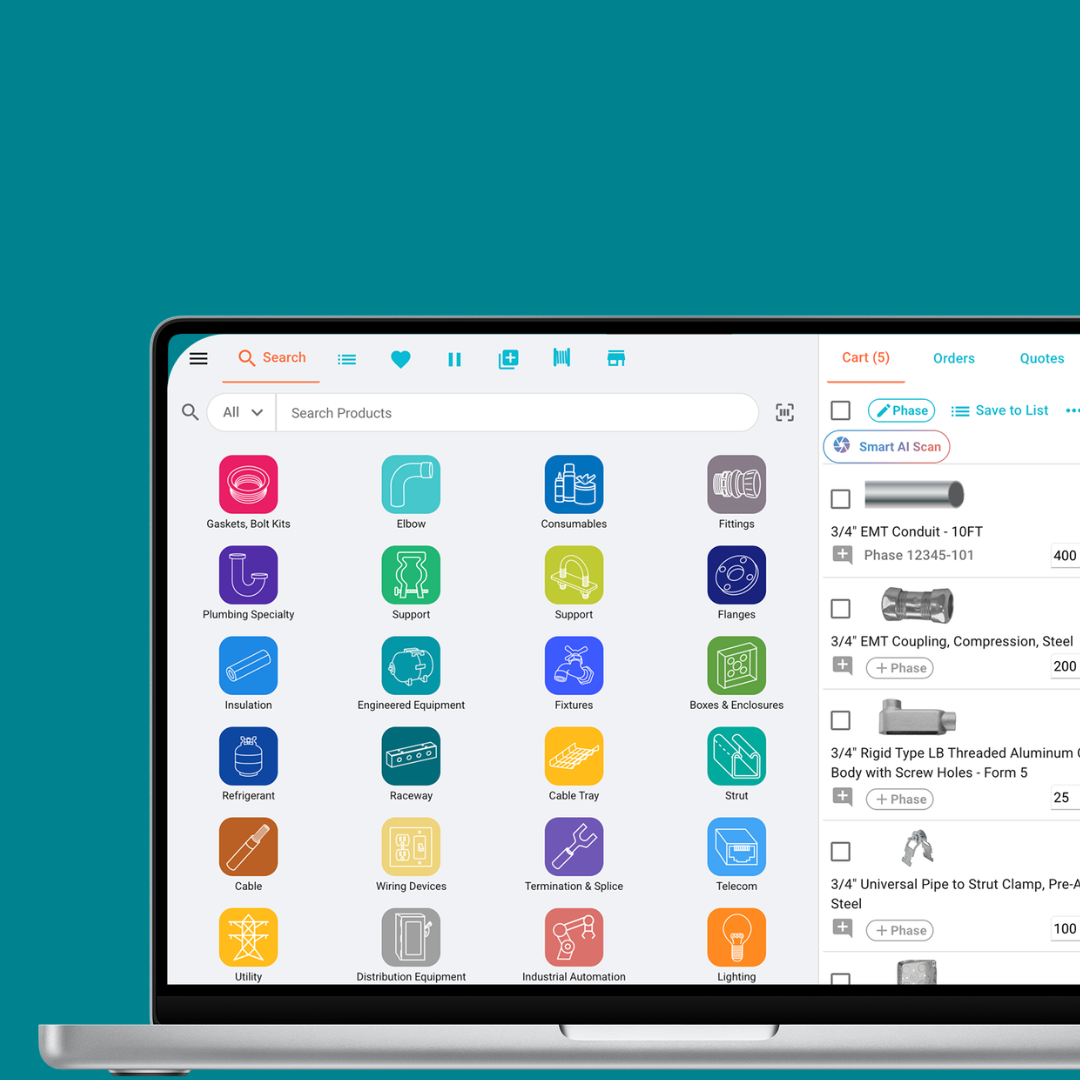
The purchasing workflow in construction starts on the job site, not in the office. A foreman identifies a need for materials and places the request directly from a phone or tablet.
In a manual process, that request travels through phone calls, text messages, or handwritten notes. By the time it reaches purchasing, details can get lost in translation. Jessica Nascusa, Senior Purchasing Agent at Morrow Meadows, described the old process: "It's kind of like playing telephone. There's a translation issue of that they want a certain part, if you don't have those exact sku numbers, it's sometimes hard to remember everything to give to the vendor, and they're thinking of a different part."
In a PO system built for contractors, the foreman browses a visual catalog with images and product specs instead of searching by manufacturer SKU. Christopher Seagrist, Prefab Coordinator at Morrow Meadows, explained how that works in practice: "You can be pretty vague. You can put in slang terms that the field uses and it knows slang terms and it brings up items based off of what you're trying to look for."
The request carries the job number, delivery location, and cost codes from the moment it's created. It routes automatically to the right approver based on the project and dollar amount. No one in purchasing re-enters data or needs to interpret handwriting.
The adoption question matters here. Contractors worry, reasonably, that field crews will not use new software. The evidence from contractors who have made the switch suggests the opposite when the software matches how people already work. At Interstates, 230 job site supervisors adopted the system quickly. Jay Kelly, Regional Manager, described why: "Once they get in there and they learn to navigate it, they understand how much time it saves and allows them to receive material on site that they actually wanted."
How purchase orders reach suppliers and match invoices
Once a material request is approved, the purchase order needs to reach the supplier and come back as a confirmed order with pricing, availability, and a delivery timeline. In a manual process, that means emailing a PDF, calling to confirm receipt, and following up on delivery status.
The depth of the supplier connection determines whether the software actually removes work or just relocates it. Surface-level integrations that email a PO as a PDF are not meaningfully different from doing it manually. Deep integration means the PO reaches the supplier electronically with line-item detail, the supplier confirms the order and expected ship date automatically, and tracking updates flow back into the system without a phone call.
Michael Sadler, Pre Construction Manager at B&D Industries, described what that visibility looks like: "We can actually follow it from our request or the foreman's request all the way through to delivery and we know an exact day when that material is coming and we can plan out that way. We can forecast when the build is actually gonna be done."
When the invoice arrives, the system compares line items, quantities, and pricing against what was ordered and what was received. This is three-way matching: PO to receipt to invoice. Discrepancies get flagged before payment rather than discovered during reconciliation weeks later. At an industry average net margin of 5 to 6%, paying incorrect invoices erodes profit on every job where it happens.
Guarantee Electrical described the difference directly: "Now we don't have to do that [spot checking]. That is all done automatically. And if someone commits a price to us, they're held at that price, and if we don't receive that price, we're alerted to it. So the checks and balances are something that really made our life infinitely easier."
How PO software changes contractor purchasing operations
The shift is not about replacing the purchasing team. It is about changing what they spend their time on.
In a manual process, purchasing coordinates between field requests, supplier communications, and accounting data entry. The bulk of the day goes to translating requests, re-entering information across systems, chasing delivery status, and manually comparing invoices to POs. Guarantee Electrical described the old workflow: "Traditionally, we would export out of our estimating system into an Excel spreadsheet and then email that out to our suppliers."
When the system handles routing, supplier communication, and invoice matching automatically, the purchasing team shifts from data entry to invoice exception management. They review flagged discrepancies, manage supplier relationships, negotiate supplier pricing, and handle the orders that need judgment rather than processing every order manually. The cost of entering the same material data three times across purchasing, receiving, and accounting is where most of that recovered time comes from.
Collins Electrical documented the scale of this shift: procurement cycles that took two to three hours per order dropped to 10 minutes. Guarantee Electrical processes 135 orders in a single day with two purchasers, a volume that would be impossible without the system handling the coordination.
For contractors where maverick spend accounts for 20 to 35% of total purchasing because field teams bypass the process entirely, the workflow change also brings spending back under management. When ordering through the system is faster than calling the supplier directly, the foreman uses the system. The purchasing team gains visibility they never had, and the company stops paying the 5 to 20% premium that off-contract purchasing costs.
How purchase order software scales with contractor growth
The workflow described above matters most at scale. A contractor processing five POs a day can manage with email and spreadsheets. A contractor processing 50 or 100 cannot, not without proportionally growing the purchasing team.
The pattern at mid-market contractors ($50 to $250 million in revenue) is consistent. Order volume grows with revenue, but purchasing headcount does not grow at the same rate. The manual process absorbs the increase through longer hours, more errors, and more invoice discrepancies that only surface after jobs close out. Only 31% of construction projects come within 10% of their original budget, and unmanaged procurement is one of the controllable factors in that gap.
The job cost data that flows through the PO system also changes financial visibility. When every purchase order carries job, phase, and cost codes from creation through invoice matching, project managers see committed costs in real time instead of reconstructing them after the fact. The CFO sees material spend across every active job without waiting for month-end reconciliation.
For contractors running service divisions alongside project work, the system needs to handle both workflows: multi-step project POs with formal approval chains and quick-turn service orders for technicians working from vans. The same visibility and matching apply regardless of the order type.
For contractors evaluating how purchase order software fits their operation, Remarcable connects field ordering, purchasing, 450+ supplier integrations, and accounting in a single system built for electrical and mechanical contractors. The best way to evaluate fit is to see it against your own purchasing workflow.
Connected purchasing and material operations for MEP contractors
See how contractors run procurement with Remarcable
Request a demo and we'll walk through exactly how it fits your team's workflow.
.png)