
AP AUTOMATION

Every invoice matched to the PO before you pay it.

Stop matching invoices by hand. Remarcable runs a 4-way match (PO, sales order, proof of receipt, and invoice) on every invoice from every supplier, so you pay for what actually shipped. Mismatches get flagged before anyone approves. Matched invoices are ready to export, already coded.

Remarcable flags a price change and an over-billed quantity on a supplier invoice and holds it before payment
Three ways invoices arrive (distributor integration, punchout, and email or PDF read by OCR) merging into one 4-way match
Three ways invoices arrive (direct integration, punchout, and email or PDF read by OCR) merging into one 4-way match

EVERY SUPPLIER

Works with every supplier, integrated or not.

Direct integration, punchout, or OCR for everyone else

‍

  • Connected distributors send invoices electronically, tied to the PO. Nothing to type or scan.
  • Punchout orders placed on a supplier's site come back to Remarcable as a PO, coded to the job.
  • Every other supplier uses OCR: connect your AP inbox in Outlook, forward the email, or upload the PDF. AI reads every line.
  • However an invoice arrives, it gets the same 4-way match.

Request a demo

A PO, sales order, proof of receipt, and invoice merging into one 4-way match result

4-WAY MATCH

Four documents. One answer before you pay.

A 4-way match checks every line against four documents.

‍

  • The PO: what you ordered.
  • The sales order: what the supplier confirmed.
  • The proof of receipt: what showed up on site.
  • The invoice: what you're billed.
  • If any of the four disagree, the line is held for approval before anyone pays it.

Learn more

Flagged invoice lines and a message to the supplier on the PO

DISCREPANCIES

Catch the price change before you pay it

550+ invoice discrepancies flagged every month

‍

  • Flagged lines sit side by side with the PO and sales order, so the problem is obvious.
  • Message the supplier from the PO, so the conversation and the fix stay on the order.
  • The corrected invoice comes back in and the flag clears.
  • Nothing gets paid until the line matches or someone approves it.

Request a demo

Job, cost and GL codes mapped between Remarcable and the accounting system

ACCURATE ACCOUNTING

Invoices that reach accounting already coded

35+ integrations with accounting and ERP systems

‍

  • Job, phase, and cost codes sync from your accounting system and stay on the order.
  • A code on every invoice line, not one lump sum per invoice.
  • Preview the export before anything reaches your accounting system.
  • POs go in as committed costs the moment the supplier acknowledges them.

See all integrations

Approval tiers: project manager over $5,000, VP over $50,000, executive over $100,000

APPROVALS

The right person signs off, every time

490 hours a year saved per accounting and AP employee

‍

  • Approvals follow the project role, so a PO or invoice goes to whoever owns that job.
  • Spending thresholds by approver, set once.
  • Subcontract and change order approvals with their own tiers.
  • No more forwarding emails to find a signature.
  • Price mismatches, over-billed quantities, and added items always go to approval, whatever the amount.
  • Invoices over the PO total by more than your set buffer can be rejected automatically.

Request a demo

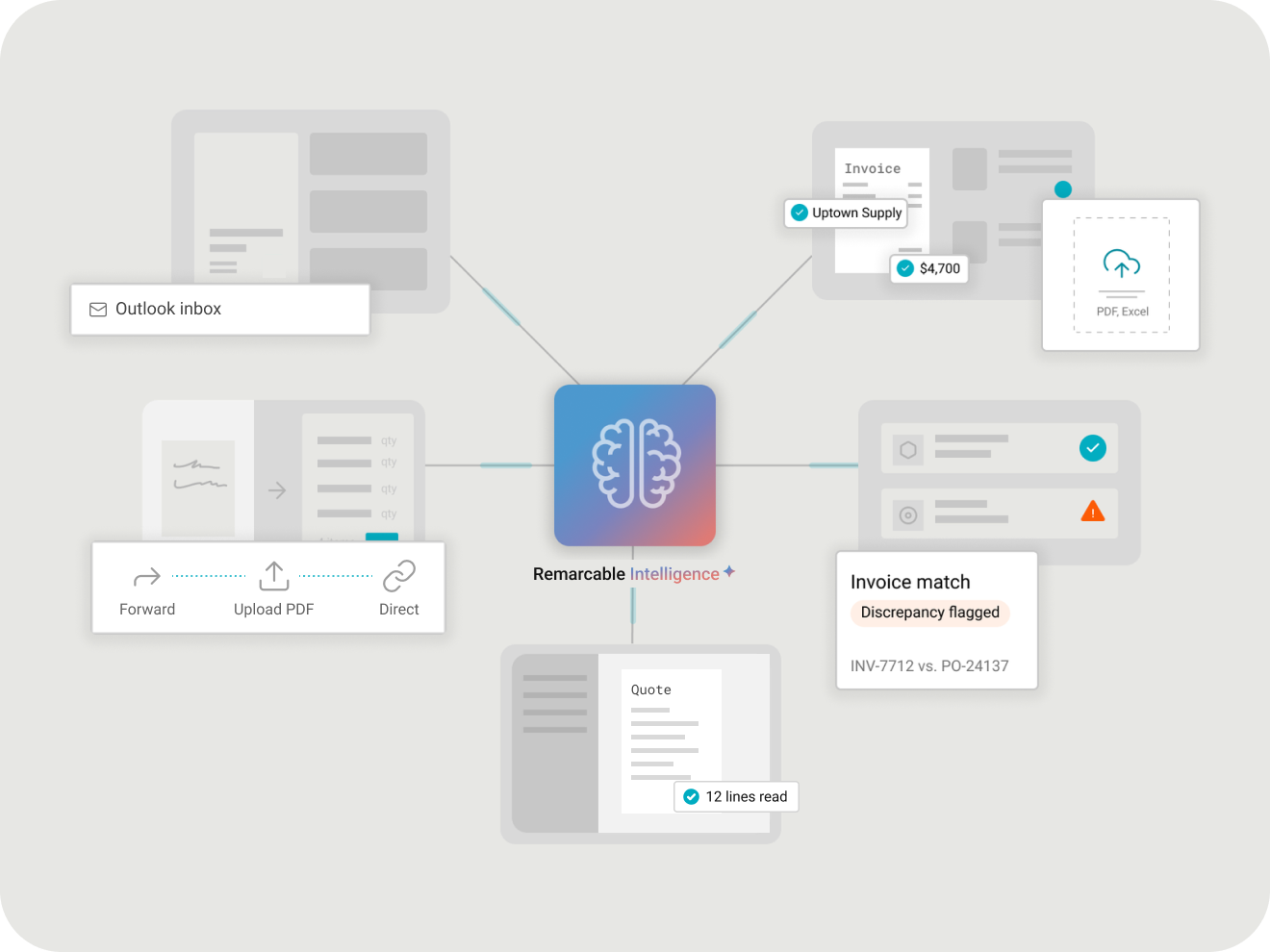
Remarcable Intelligence reading supplier invoices from Outlook, forwarded email, and PDF upload, then checking every line

INVOICE CAPTURE

The invoice hits your inbox. Remarcable Intelligence takes it from there

Works with or without a direct supplier integration

‍

  • Connect Outlook and supplier invoices come straight in from your inbox.
  • Or forward by email, upload a PDF, or connect the supplier directly.
  • AI quote and invoice processing reads every line, so nobody retypes it.
  • Every line checked against the PO before it moves on.

Request a demo

What’s inside AP automation

Invoice capture

Pulled from Outlook, forwarded by email, uploaded as a PDF, or sent by a connected supplier.

4-way match

The PO, sales order, proof of receipt, and invoice checked against each other.

Mismatch flags

Price and quantity mismatches flagged against the PO and what was received, line by line.

Over-billing buffer

Invoices over the PO total by more than your set buffer can be rejected automatically.

Approvals

Invoices route by project role, with spending thresholds by approver.

Coded export

Every invoice line goes to accounting with its own job, phase, and cost code.

Export preview

See the export before anything reaches your accounting system.

Committed costs

POs go to accounting as committed costs once the supplier acknowledges them.

Audit trail

Every PO, receipt, invoice, and approval on one order history.

Every dollar accounted for, line by line.

490

hours saved a year per accounting and AP employee

84%

of managers say invoices match POs and receipts more often

Source: Remarcable ROI study, customer survey.

Connected to the accounting system you already run.

Jobs, cost codes, and tax rates sync in. POs and coded invoices go back out. Remarcable works with 35+ accounting and ERP systems, from Viewpoint Vista and Spectrum to Sage, COINS, Foundation, ComputerEase, and QuickBooks.

Explore all integrations

“We look to software like Remarcable to be able to solve manual repetitive tasks, like material ordering, like matching an invoice to a purchase order.”

Joel Van Egdom, Chief Financial Officer
Interstates

FAQ

What does AP automation do in Remarcable?

It runs a 4-way match on every supplier invoice, flags price and quantity mismatches, and gets coded invoices ready to export to your accounting system.

What is a 4-way match?

Remarcable checks the PO, the sales order, the proof of receipt, and the invoice against each other. If any of them disagree, you see it before you pay.

Does this replace my AP team?

No. Your team still approves and pays. Remarcable does the matching and the retyping.

Is it AI?

AI reads the invoice and pulls out each line. Your POs and your approvals decide what's right, and your team sees every flag.

What if a supplier isn't integrated with Remarcable?

Connect Outlook so invoices come in from your inbox, or forward the invoice by email or upload the PDF. AI quote and invoice processing reads it the same way.

Which accounting systems does Remarcable work with?

More than 35. See the full list on the Integrations page.

Does Remarcable only work with integrated distributors?

No. Connected distributors send invoices electronically. For every other supplier, Remarcable picks invoices up from your AP inbox in Outlook, from a forwarded email, or from an uploaded PDF, and AI quote and invoice processing reads them.

Does every invoice have to go through OCR?

No. Invoices from connected distributors arrive as data, so there's nothing to read. AI capture is for the suppliers that aren't connected.
Pay the right invoice the first time.

See invoice matching on your own POs.

Request demo